Sharing and export
Sharing
Share a note with a link, choose whether people can edit, and stop sharing.
WebiPadiPhoneAndroid
Notes are private until you share them. Sharing a note creates a link, and anyone with the link can open it.
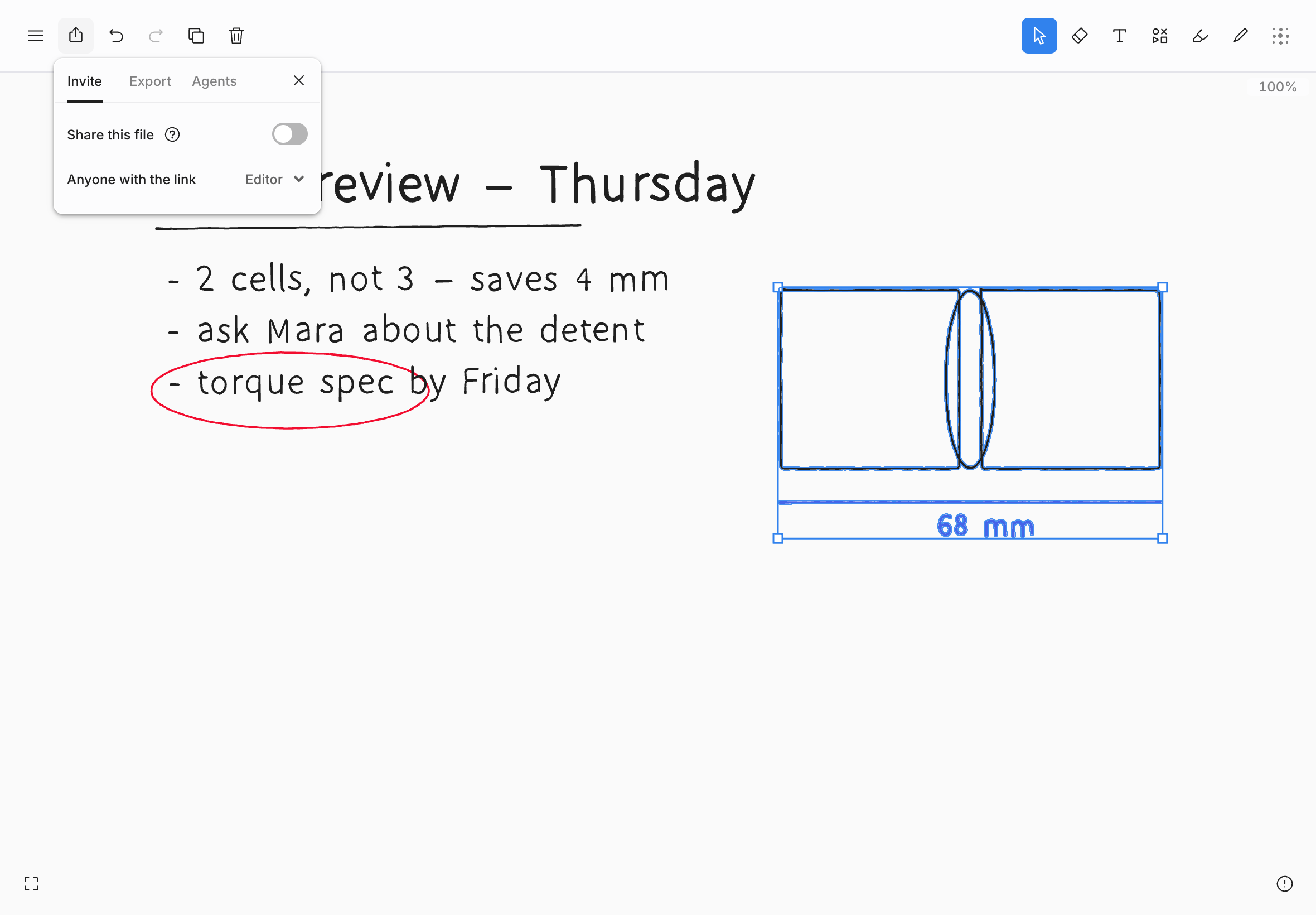
Share a note
- Choose Share in the top bar, or File › Share… in the editor menu.
- Turn on Share this file.
- Under Anyone with the link, choose Editor or Viewer.
- Choose Copy link, and send it however you like.
The panel also shows a QR code under Copy link, so someone next to you can open the note on their phone.
To send people to one part of the note, use the arrow beside Copy link and choose Copy with viewport: the link opens the note showing what you see. On the web, iPhone, iPad, and Android, Copy as › Link in the Edit menu or the context menu copies the same kind of link, framed around your selection if you have one.
| Role | What they can do |
|---|---|
| Editor | Everything you can do with the drawing: write, erase, move, and undo their own changes. New links start as Editor. |
| Viewer | Look, pan, zoom, select, copy, and export. The note reads Read only for them. |
Only the owner can share a note or change its role. You need a connection to do either; offline, the panel says sharing is unavailable rather than guessing.
Stop sharing
Turn off Share this file. Everyone else with the note open is removed at once, and the old link stops working. If you share the note again, it gets a new link, so the old one stays dead.
Changing a link from Editor to Viewer takes effect straight away for everyone who has the note open.
Opening a shared note
When you open someone's link while signed in, the note joins your library. On iPad, iPhone, and Android its card is marked Shared with me. If you aren't signed in, the note opens without an account, and it isn't added to any library.
While other people are in the note, you see their cursors, and their strokes appear as they draw.
Shared notes and connections
Your own notes work offline. Someone else's note doesn't: each time you open it, tldraw notes checks with the service that you still have access, so it won't open without a connection.
If your connection drops while you're editing someone else's note, you can keep going for about ten seconds. After that the note becomes read-only until you're back online, so nothing you do is lost or quietly rejected later.
What sharing doesn't share
- Folders. Where you file a shared note is up to you, and nobody else sees it. See Organizing files.
- Duplicates. A copy of a shared note is a new, private note.
- Your identity. Someone who opens your link without signing in can't see who owns the note.
- Local. It never syncs, so it can't be shared. Use export instead.